ELECTION CAMPAIGN MANAGEMENT · BANGLADESH

Election campaign software.
One connected team.

Votix connects your campaign office and field team with voter management software, an Android worker app and election-day coordination tools built for Bangladesh.

Web management panelAndroid worker appBangla & English
THE OFFICE + THE FIELD, CONNECTED
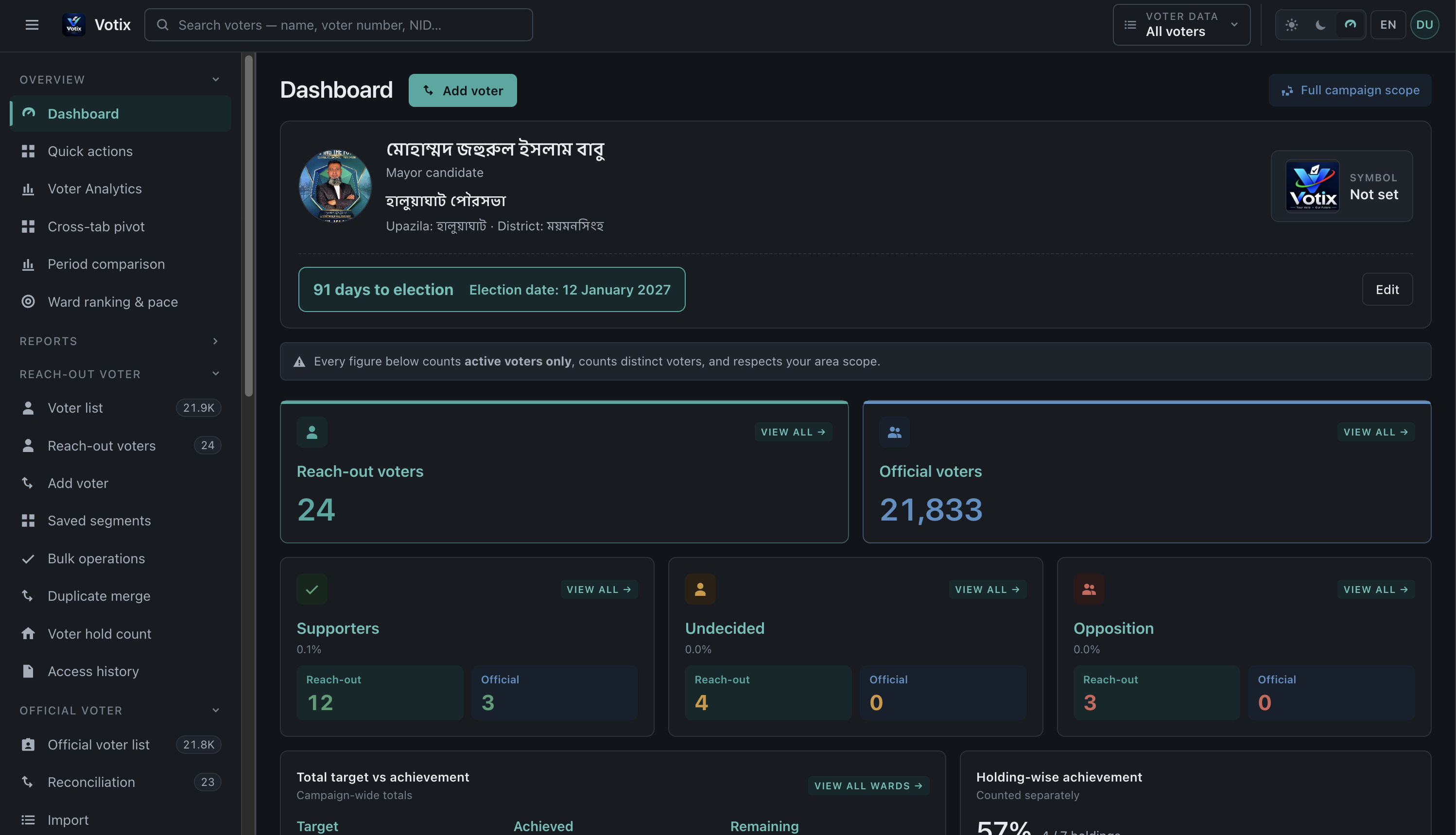
Votix election campaign management dashboard with official voter lists, voter analytics, ward rankings and campaign targets
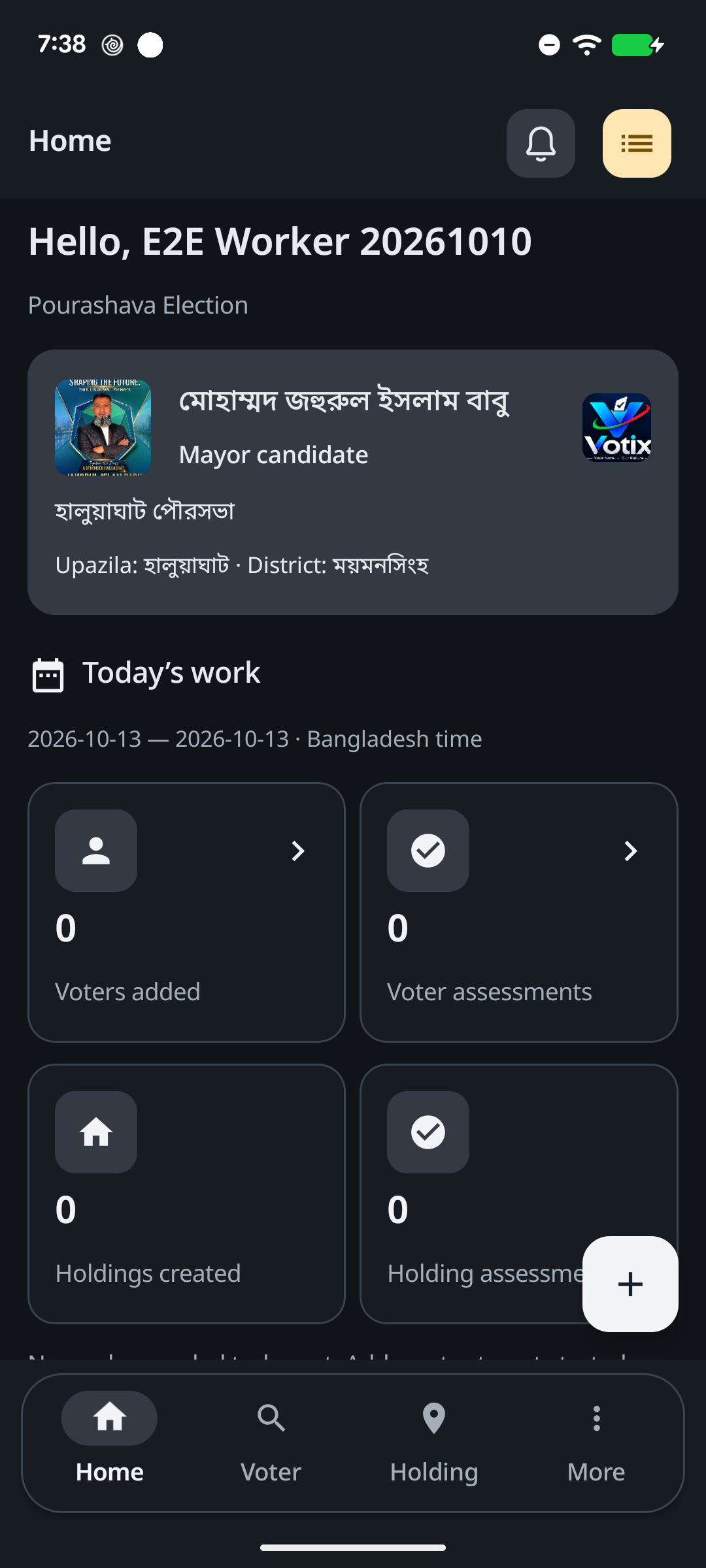
Votix Android worker dashboard with daily voter and household activity
Office ↔ Field

Actual Votix web dashboard and Android worker app · Select the dashboard to view full size

01 / PlanOrganise your campaign
02 / CoordinateEquip your field team
03 / UnderstandReview activity by area
04 / OperateCoordinate election day

THE CAMPAIGN WORKSPACE

Voter management software.
A coordinated campaign.

Paper lists, separate spreadsheets and disconnected updates make it hard to know what is happening. Votix gives the office and the field team a shared working system.

FOR THE CAMPAIGN OFFICE

The web management panel.

Build a structured campaign database, organise your geography and keep people, plans and reports in view.

  • Official and manual voter records with import review
  • Shared assignments, daily work plans and admin task approval
  • Cross-tab analytics, ward targets, budgets and PDF/CSV reports
  • Polling centres, agent rosters and incident oversight
Explore office capabilities ↗
FOR WORKERS & POLLING AGENTS

The Android field companion.

A focused, bilingual workspace for the people doing the work, connected to the same campaign server.

  • Find voter records and record field assessments
  • Create households, link voters and capture surveys
  • Track tasks, listen to voice messages and review My Work
  • Incident reporting and role-dependent election-day workflows
Meet the worker app ↗
Actual Votix worker app home screen in dark mode
Bangla + EnglishYour day's work, in view

BUILT FOR THE FIELD

An Android worker app.
Your campaign in hand.

A worker should spend less time finding information and more time getting the job done. Votix keeps everyday field workflows close at hand.

Make every visit easier to follow.

Search voters, open their profiles, create records and submit assessments. Link people to households and keep field observations connected to the right records.

Internet connection required · Access limited to assigned areas
Request a worker-app walkthrough ↗

ONE PLATFORM, THE WHOLE WORKFLOW

Voter lists, campaign analytics
and everyday team operations.

Explore the prominent capabilities of the Votix web panel and Android worker app, from record preparation to task review, communication and campaign oversight.

01 / VOTER & HOUSEHOLD RECORDS

Know your records. Keep them connected.

01 /

Official & reach-out voter lists

Work with official voter rolls and campaign reach-out records. Search Bangla or English names, voter numbers and identifiers; open detailed profiles and add voter photos where enabled.

Web panel + Worker app
02 /

Filters & saved segments

Filter voters by area, support status, gender, age, profession, polling centre and other recorded attributes. Save reusable segments and share them within permitted access.

Web panel
03 /

Imports, reconciliation & duplicates

Import voter lists, preview batches before commit and review import history. Reconcile official records with campaign entries and merge duplicate records.

Web panel
04 /

Households & bulk record updates

Create holdings, link household members and preserve survey history. In the panel, apply confirmed support, area, holding or status changes to a selected scope.

Web panel + Worker app

02 / FIELD WORK & TASK ACCOUNTABILITY

Give every assignment a clear next step.

05 /

Assessments & visit outcomes

Record support status, visit outcomes, notes, VIP flags and revisit needs against voter records. Keep an assessment history instead of losing earlier field observations.

Web panel + Worker app
06 /

Revisit & assessment quality review

Review outstanding revisits, stale or never-assessed records, spot-check reliability and administrative overrides to keep field information useful.

Web panel
07 /

Shared tasks & admin approval

Assign one task to an individual, selected workers, all eligible workers or a ward team. Each worker has an independent status; submitted completion goes to the assigning admin for approval.

Web panel + Worker app
08 /

My Work & worker performance

Track voter additions, assessments, household creations and surveys. Workers can review Today, Yesterday, This week, This month or a custom date range; the office can inspect individual performance.

Web panel + Worker app

03 / ANALYTICS, TARGETS & REPORTS

See where work stands, by area and over time.

09 /

Campaign dashboard & area activity

View official and reach-out counts, support breakdowns, household achievement and daily activity. Worker Home includes personal task counts and village-level attribution.

Web panel + Worker app
10 /

Cross-tabs, comparisons & ward rankings

Explore demographic and geographic breakdowns, cross two dimensions, compare periods and review ward rankings and pace from dedicated analytics screens.

Web panel
11 /

Ward targets & shortfall alerts

Set ward-level campaign targets, review rolled-up achievement and identify shortfalls that need follow-up. Keep targets alongside actual recorded progress.

Web panel
12 /

PDF & CSV reports

Filter supported reports by date, area and other relevant fields, then request PDF or CSV downloads. Review export status and history in the reporting workspace.

Web panel

04 / MESSAGES & CAMPAIGN OPERATIONS

Keep instructions, people and resources in view.

13 /

Text, image & voice notifications

Send titled worker notifications with text, images and recorded or uploaded voice messages. Workers can open messages and use prominent play/pause controls in the app inbox.

Web panel + Worker app
14 /

Audience selection & read receipts

Choose one worker, selected workers, all eligible workers or a ward audience. Review per-worker reads; workers see unread labels and an unread-count badge.

Web panel + Worker app
15 /

Polling centres & election-day oversight

Configure centres and booths, review pending centre assignments, organise agent rosters and monitor the live board and incident register. Polling-agent workflows depend on enabled modules and access.

Web panel · Role-dependent app workflows
16 /

Campaign budgets & expense control

Record expenses, plan budget lines and review variance, overspend alerts and cost-per-supporter reporting from the campaign office.

Web panel

05 / CAMPAIGN SETUP & CONTROLLED ACCESS

Configure the campaign around your team.

17 /

Campaign areas & candidate profiles

Configure campaign geography, candidate details, photos and symbols, councillors and VIP records. The worker Home screen shows the current campaign candidate and election area.

Web panel + Worker app
18 /

Roles, invitations & ward assignments

Invite office users, configure permission matrices, assign workers to wards and control mobile access. Campaign and area boundaries are enforced by the server.

Web panel
19 /

Audit & voter access history

Review administrative audit logs and voter access history, including who converted official records into reach-out records and the field activity that followed.

Web panel
20 /

Bangla, English & appearance controls

Switch between Bangla and English. The Android app offers System, Light and Dark modes plus persistent colour palettes, while keeping keyboard language under the user’s control.

Web panel + Worker app

Plan the right setup for your campaign.

Available modules and workflows depend on your deployment, roles and permissions. The worker app requires internet access. SMS and automated voice-broadcast delivery need gateway configuration; background push notifications need Firebase setup. Confirm polling-agent access and compatible thermal-printer hardware during your demo.

FROM INSTRUCTION TO FOLLOW-THROUGH

Assign the work.
Keep the team informed.

Two everyday workflows connect campaign-office decisions to each worker’s phone.

TASKS WITH INDIVIDUAL ACCOUNTABILITY

One task. Each worker’s progress.

Give the same instruction to selected workers or a whole ward. Track each assignment separately and review submitted completion in the panel.

  1. Not started
  2. In progress
  3. Pending review
  4. Admin-approved completion

Worker submission and approved completion remain separate, so the office can see what still needs review.

RICH WORKER NOTIFICATIONS

Written, pictured or spoken.

Write an instruction, attach an image or record a voice message. Choose the recipients and follow per-worker read receipts.

  • Single, selected, all-worker and ward audiences
  • Titled messages with images and voice playback
  • Unread indicators and an inbox refresh action
  • Private attachments checked against recipient access

An in-app inbox keeps campaign instructions in one place for authorised recipients.

HOW IT COMES TOGETHER

A shared process.
A clearer working day.

01

Set up the campaign

Define campaign areas, configure modules and prepare your voter records through imports and review.

02

Give everyone their scope

Assign wards and permissions, create individual or shared tasks and give workers access to their campaign workspace.

03

Capture work in the field

Workers search records, submit assessments, update households and report activity through the Android app.

04

Review and coordinate

The office approves task completion, reviews area targets and reports, and coordinates polling agents and incidents on election day.

CONTROLLED ACCESS

The right workspace.
For the right people.

Campaign information needs clear boundaries. Votix combines campaign isolation, roles and area assignments to control access.

01

Campaign isolation

Campaign-owned records are scoped in the application and protected through database row-level security.

02

Ward-scoped field access

Workers receive assigned areas and mobile permissions. Access is enforced by the server on requests.

03

Account and device control

Administrators can deactivate workers or revoke mobile access. Revoked sessions return workers to sign-in.

GOOD QUESTIONS

Before your
first demo.

Need to discuss your campaign's setup?
Talk to our team ↗

Can tasks be assigned to a group of workers?

Yes. A task can be assigned to one worker, selected workers, all eligible mobile workers or a ward team. Each worker has an independent assignment status. A worker submits completion for review, and the assigning admin approves it.

Can the office send voice messages to workers?

Yes. Worker notifications support titles, text, images and recorded or uploaded voice messages. The office can select individual, multiple, all-worker or ward recipients and review per-worker read receipts. Workers play voice messages in the app inbox.

Which campaign reports can we download?

The web panel supports PDF and CSV report downloads with report-specific filters and export history. It also includes campaign analytics, cross-tabs, period comparisons, ward rankings, target achievement and shortfall views.

Can Votix support election campaign teams in Bangladesh?

Votix supports campaign area hierarchies, ward-based worker assignments, Bangla and English workflows, official voter lists and polling-centre operations. Contact the team to discuss your election type, campaign geography, voter-list files and deployment needs.

What is Votix?

Votix is an election campaign management platform combining a web panel for campaign offices with an Android app for field workers and polling agents. It brings voter records, household surveys, assignments, reporting and election-day coordination into one system.

Does the worker app work offline?

The current worker app requires an internet connection. Voter searches, assessments and updates use the campaign server. Workers can see connection state and receive submission feedback; offline operation is not part of the current app.

Can workers see every voter in a campaign?

Worker access is limited by assigned wards and mobile permissions. The server checks access on requests, while office administrators manage worker assignments and account access.

Does Votix support Bangla?

Yes. The Android app supports Bangla and English, including Bangla typography and digits. The panel supports Bangla voter-name search and campaign area hierarchies.

Can we import existing voter lists?

The web panel includes voter-list import, batch preview, duplicate review and official-to-manual record reconciliation. Discuss your source files and import requirements during a demo.

How do we get started, and what does it cost?

Contact Black & White Studio to arrange a demo and discuss campaign size, enabled modules, hosting, onboarding and a quotation. No public subscription price or Play Store download is currently listed on this page.

Can polling agents use the app?

The platform includes polling-centre and booth management, agent rosters and election-day reporting workflows. Worker incident reporting is available; polling-agent app access and enabled election-day destinations should be confirmed for your deployment during a demo.

LET'S WALK THROUGH YOUR CAMPAIGN

Bring your team together.
Start with a demo.

See the web panel and worker app, discuss your campaign structure, and plan the right setup with Black & White Studio.

+880 1945 936 934Dhaka, BangladeshPricing and deployment by enquiry