A proven parking management system for shopping malls and commercial buildings. Issue a printed QR ticket at the gate, close the vehicle out with the fee calculated automatically, and reconcile the shift against a report no one can quietly edit. Run it on a booth PC — or entirely from an Android device with an integrated printer, with no computer at all.
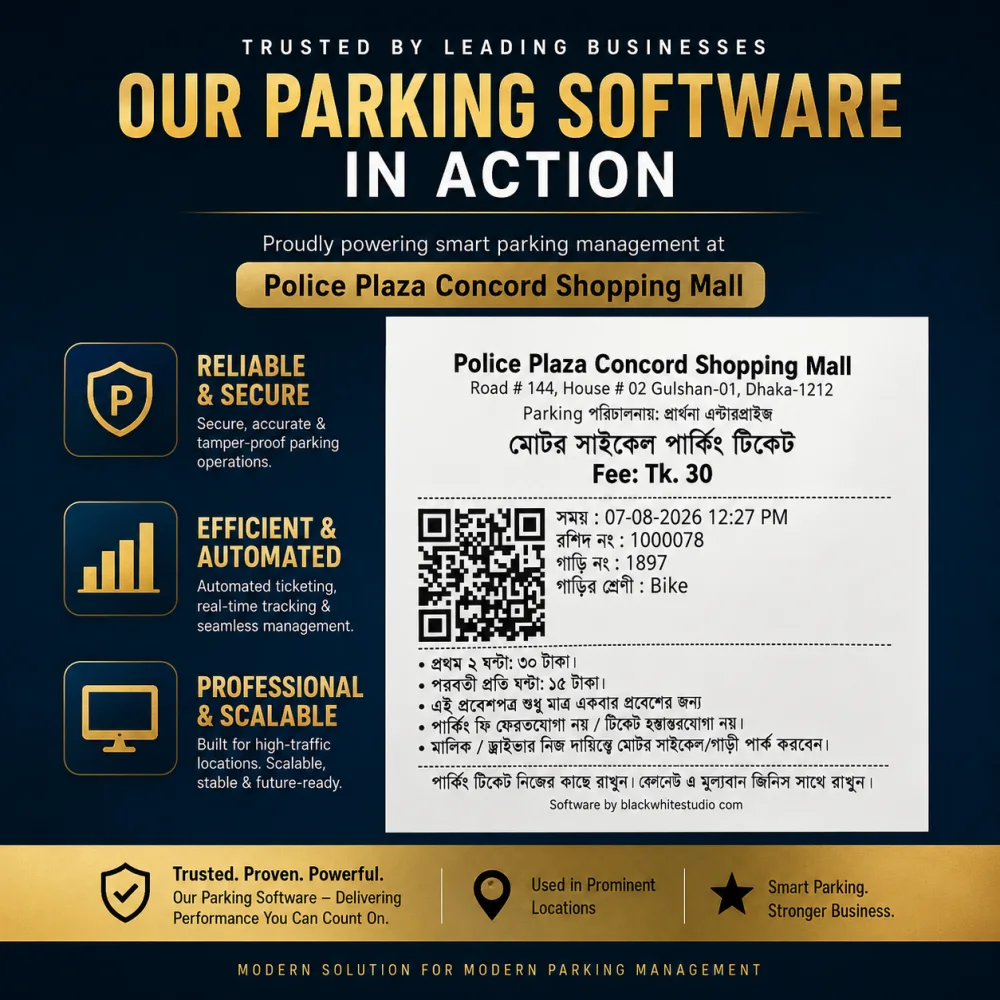
Running live at Police Plaza Concord Shopping Mall, Gulshan-1, Dhaka.
One of Dhaka's most prominent shopping malls, in the heart of Gulshan-1, runs its daily parking operation on this system — bikes and cars in and out of basement parking, every movement ticketed, priced and logged. It is not a prototype or a pilot: it handles real traffic, real cash and real shift handovers.
Most parking operations in Bangladesh still run on handwritten slips and mental arithmetic. That is where the revenue quietly disappears — and where the arguments at the exit start.
A slip that was never written means a fee that never reaches the owner. With no numbered ticket per vehicle, there is nothing to reconcile the cash box against.
Operators calculate durations in their head under pressure. Some customers are undercharged, others overcharged — and both cost you.
No entry time on record means no way to settle a dispute. The queue backs up while a supervisor is called over.
Nobody can say how many vehicles are parked, which ones have overstayed, or whether a car left without paying.
When a shift ends there's no per-operator total, so a shortfall can never be traced back to when or where it happened.
Without daily and monthly figures you can't see peak hours, negotiate a lease, or prove what the parking asset is actually worth.
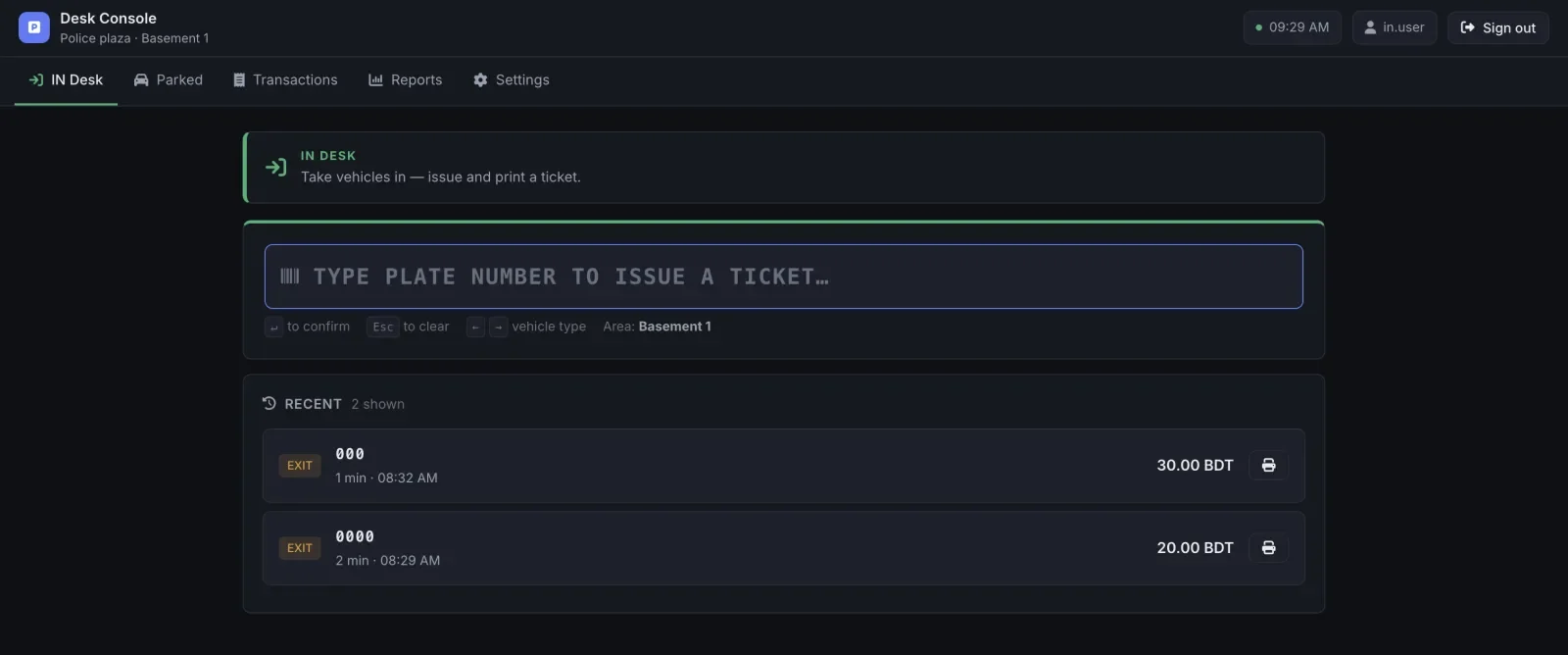
The gate console is deliberately boring: one field, one action, one printed ticket. An operator learns it in a single shift, and it stays fast when there are ten bikes waiting behind the barrier.
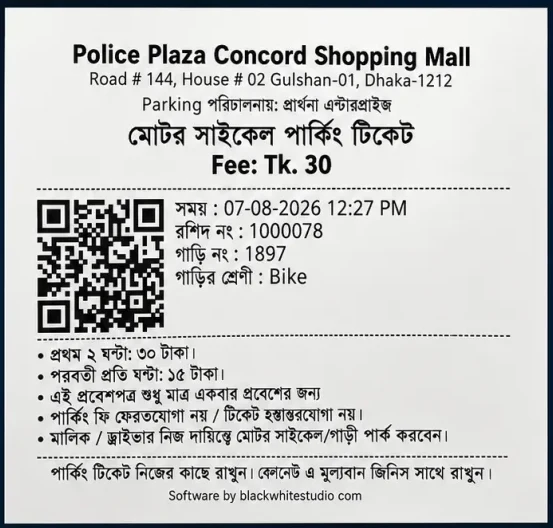
Every entry produces a thermal-printed ticket carrying the QR code that closes it out later. The layout is yours — property name and address, operator, rate rules and terms, in Bangla, English or both.
Everything an operator needs at the barrier, and everything an owner needs to trust the number at the end of the day.
One field, one keystroke. Type or scan the plate, pick the vehicle type with the arrow keys, and the ticket prints — no mouse, no menus.
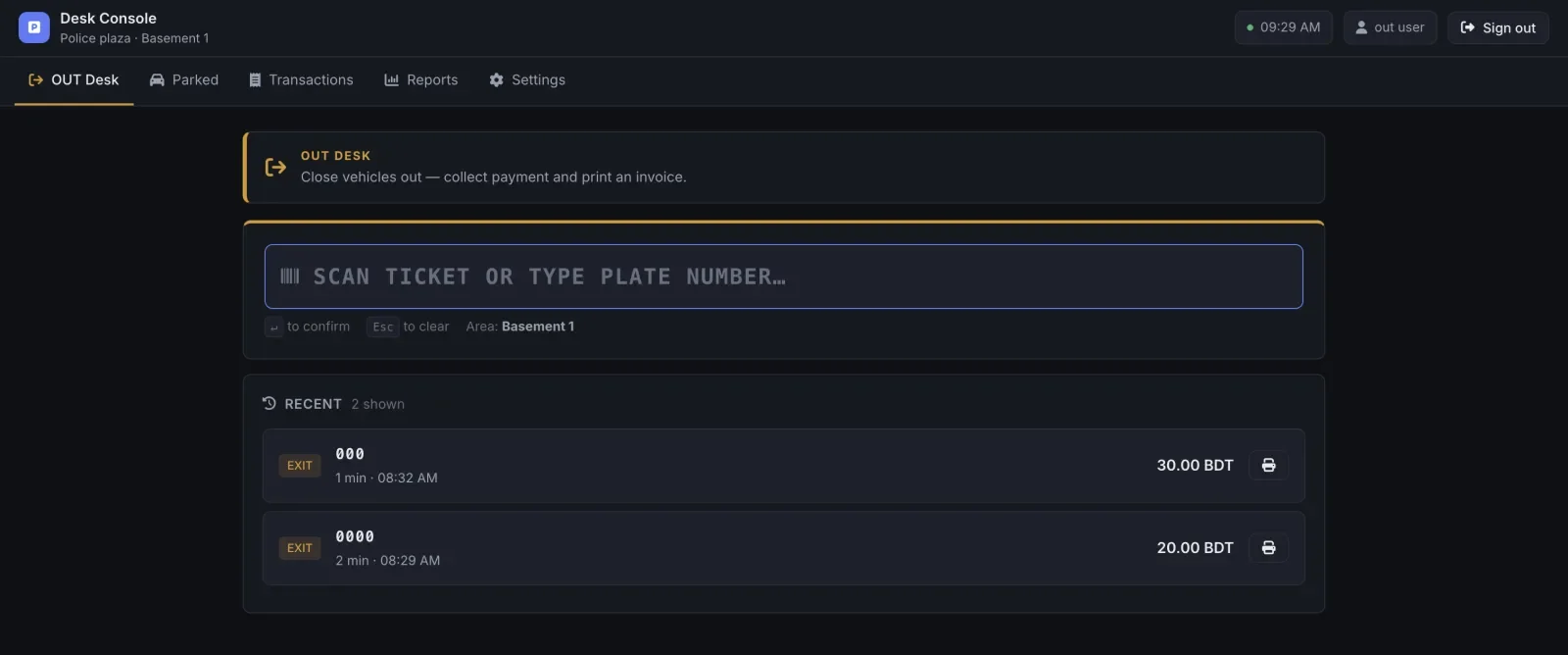
Scan the QR or type the plate. Duration and fee are calculated from the entry record, payment is taken and the invoice prints.
A first slab plus an hourly rate after it, configured separately for bikes, cars and trucks. Change the rates without touching the software.
See exactly what is inside right now, how long each vehicle has been there, and which ones have overstayed.
Every entry and exit with its ticket number, times, amount, operator and area — searchable by plate or receipt number.
Daily, shift-wise and per-operator totals to reconcile against the cash box, plus period reports for the owner or landlord.
Separate IN and OUT users with their own logins, so every ticket and every taka is attributable to a person and a shift.
Define basements, zones and gates. Each desk is bound to its area; reports read per area or consolidated for the property.
Works with standard 58mm/80mm desk printers and Android devices with an integrated thermal printer — so the ticket prints in the operator's hand. Reprint any ticket or invoice from the transaction list.
Tickets, terms and rate rules print in Bangla, English or both — matching how your customers actually read.
The gate keeps issuing and closing tickets through an interruption and reconciles when the connection returns. Cars never wait on the internet.
Records are append-only with the operator and timestamp attached, so a settled transaction can't be quietly rewritten later.
Two ways to deploy, and you can mix them across gates. A booth with a PC console and a desk printer, or a single Android device with an integrated thermal printer that runs the entire operation on its own — no computer required.
The primary workplace. Runs in a browser on any Windows PC or laptop at the gate, wired to a thermal printer and optionally a QR scanner.
No computer required. On an Android device with an integrated thermal printer, one handheld runs the entire parking operation — take the vehicle in, print the ticket, close it out and collect payment, all from the same device in the operator's hand.
An Android handheld with an integrated printer is a complete parking system by itself. That matters where a PC simply doesn't fit: an open-air lot, a rooftop, a temporary event gate, a second entrance you only staff at peak hours, or a site where there is nowhere safe and dry to put a desktop. The operator walks to the vehicle instead of the vehicle queueing at a booth — and the ticket prints in their hand.
This is a development-focus split, not a capability limit — the Android app is a complete deployment on its own, and plenty of sites run entirely on a handheld with an integrated printer and never install the PC console at all.
Four steps, and the money is accounted for at every one of them.
The operator types or scans the plate and picks the vehicle type. A QR ticket prints in seconds.
It appears on the live parked list with its entry time, area and running duration.
Scan the ticket at the OUT desk. The fee is calculated, payment is recorded and the invoice prints.
The operator's shift total is reconciled against the cash box, and the day rolls up into the owner's report.
If your site takes parking fees at a gate, this replaces the slip book.
High-volume basements with mixed bike and car traffic, multiple desks and shift-based staff.
Office towers with tenant and visitor parking, where landlords need auditable monthly numbers.
Constant short-stay turnover where fee disputes at the exit cost time no one has.
Guest and walk-in parking with different rates, comps and validation rules.
Large sites with several gates that need one consolidated view of what's inside.
Contractors running parking for someone else, who must prove collections to the property owner.
Yes. It runs live at Police Plaza Concord Shopping Mall in Gulshan-1, Dhaka — one of the city's most prominent shopping malls — handling daily IN and OUT parking traffic across basement parking areas. You are welcome to see it working before you commit to anything.
Yes — and mobile is not a second-class option. The gate booth can run a keyboard-first web console on a PC or laptop with a thermal ticket printer. Equally, an Android device with an integrated printer can run the whole operation by itself: take vehicles in, print tickets, close them out and collect payment, with no computer involved. Both work against the same live data, so a vehicle taken in on a handheld can be closed out at the desk, or the other way round.
Pricing is slab-based per vehicle type. You configure a first slab — for example, the first 2 hours at 30 BDT for a bike — and an hourly rate after that. At the OUT desk the system reads the ticket, computes the duration and shows the payable amount automatically. No mental arithmetic, and no operator discretion.
Every vehicle gets a numbered QR ticket at entry, and no vehicle can be closed out without one. Fees are computed by the system rather than the operator, each ticket is tied to the signed-in user and their shift, and transaction records are append-only with an audit trail. At the end of a shift you reconcile the report against the cash collected — a gap is visible immediately, and traceable to a desk and a person.
Less than you'd expect. The lightest setup is a single Android device with an integrated thermal printer — that one handheld runs the entire gate, with no computer at all. If you prefer a booth, use a standard PC or laptop per desk with a 58mm/80mm thermal receipt printer and optionally a QR scanner. No proprietary barriers, boom gates or number-plate cameras are required — though we can integrate them if you already have them.
Yes. The gate desks are built to keep issuing and closing tickets through a network interruption and reconcile once the connection is back, so vehicles are never held up at the barrier by a router.
Yes. Tickets print in Bangla and English, and the whole layout is customisable per site — property name and address, the operating company, rate rules, and your terms and liability notice.
Yes. Parking areas, basements and zones are configurable and each desk is bound to its own area. Reports can be read per area or consolidated across the entire property.
For a typical mall or commercial building, 1–3 weeks — covering a site survey, rate configuration, ticket design, printer setup and operator training. Smaller sites go live faster. The initial site survey and consultation are free.
You do. The system can be deployed on your own infrastructure or hosted by us, and your transaction data is exportable at any time.
Tell us about your site — how many gates, how many basements, what you charge — and we'll walk you through the console with your own numbers in it. Site survey and initial consultation are free.
The Smart Parking Management System is designed, built and supported by Black & White Studio — a Dhaka-based software studio building Android apps, web platforms and business automation for companies in Bangladesh and abroad.

Where 0 and 1 become infinite possibilities.